Case Study
15 MINUTES PER DRIVER. NOW ONE REVIEW CARD.
A family-run freight carrier's nightly dispatch email, morning fleet check, load paperwork, and repair and payables mail, handled by one desktop app with five tabs. It reads the documents, and a person approves every write.
Freight & Trucking
7 trucks
Automation
July to September 2026
A seven-truck carrier was retyping the same load details out of rate confirmations every night, walking the fleet truck by truck at 5 AM, and sorting repair bills out of the inbox by hand.
We built one desktop app that reads the documents, drafts the work, and keeps a person in the approval seat for every read that becomes a write.
2 WEEKS
Initial Build
About two weeks from access handover to the first three tabs live on the client's own machine
15 MIN
Per Driver, Per Day
The hand-built dispatch email the app now drafts
2,526
Automated Checks Green
1,704 tests plus 822 application checks at the latest build
The Situation
Kelley Transportation is a family-run interstate carrier running seven trucks. The owner handles daily dispatch, the operations manager books loads at night, and a part-time dispatcher runs the morning truck check remotely. Three people, one shared spreadsheet, and a paper trail that arrives from every direction.
Every evening the office built each driver's next-day dispatch email by hand. Read the operations spreadsheet, dig the load's rate confirmation out of a mailbox holding about 12,000 messages or a shared drive holding about 123,000 files, then retype pickup addresses, appointment windows, and reference numbers into an email template. About 15 minutes per driver, every day, on information that already existed in writing somewhere.
At 5 AM someone checked every truck's position against its delivery appointment, one truck at a time in the fleet portal, converting time zones in their head as they went. Meanwhile new load paperwork kept landing by email and by drive, and it had to be noticed by a person before it could be retyped onto the spreadsheet. Anything not noticed was not scheduled.
The load paperwork was not the only mail. Repair invoices, work orders, estimates, fuel and toll bills, and the rest of the payables landed in the same office mailboxes, with nobody sorting them by truck. Finding every repair document for one truck meant searching the inbox by hand.
Before calling us, the operations manager had spent weeks trying to wire this together with general-purpose AI chat tools. It demoed well. It never survived real paperwork.
What We Built
One desktop app that runs on the client's own machines, with five tabs inside it, one per job. Each tab reads the paperwork the office already receives and stops at a review screen. Where the app writes anything back, a person presses the button.
Loads
EVERY DOCUMENT ON THE LOAD IT BELONGS TO
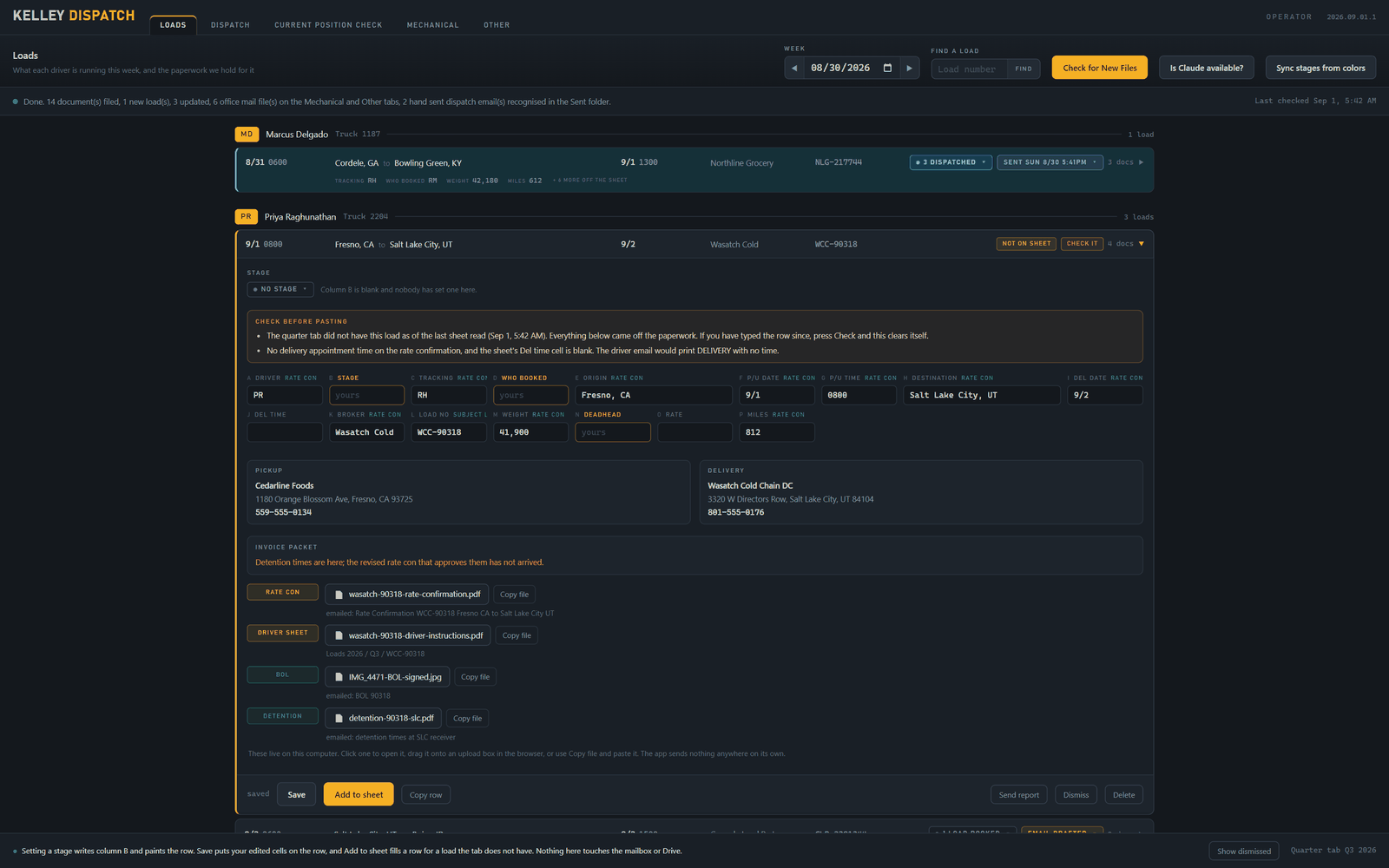
The tab the app opens on. It watches where freight paperwork lands, the dispatch mailbox, the other office mailboxes, and the shared drive, and draws one week of the operations spreadsheet as a board with a section per driver and each load's documents in a drawer. The rate confirmation and everything else that arrived for a load sit on that load instead of in the inbox they came through.
Documents are judged by what their pages say, not by what their filenames claim. A file the tab cannot place is kept and flagged for someone to look at, never silently dropped, and a disagreement between two documents about the same load is surfaced rather than resolved by guesswork.
This is the one tab that writes to the spreadsheet, and it does so three ways, each on a button press: setting a load's stage, saving edited cells on a row the sheet already carries, and adding a whole row for a load it does not. Before every write it re-reads the row and confirms the load number still matches. It refuses by name when it cannot place a row safely, whether the reason is no driver, no block that week, a duplicate load number, or a row that moved. It never inserts rows, never touches the owner's own already-sent marker column, and never writes to the shared drive.
Dispatch
DRAFTED FROM THE PAPERWORK
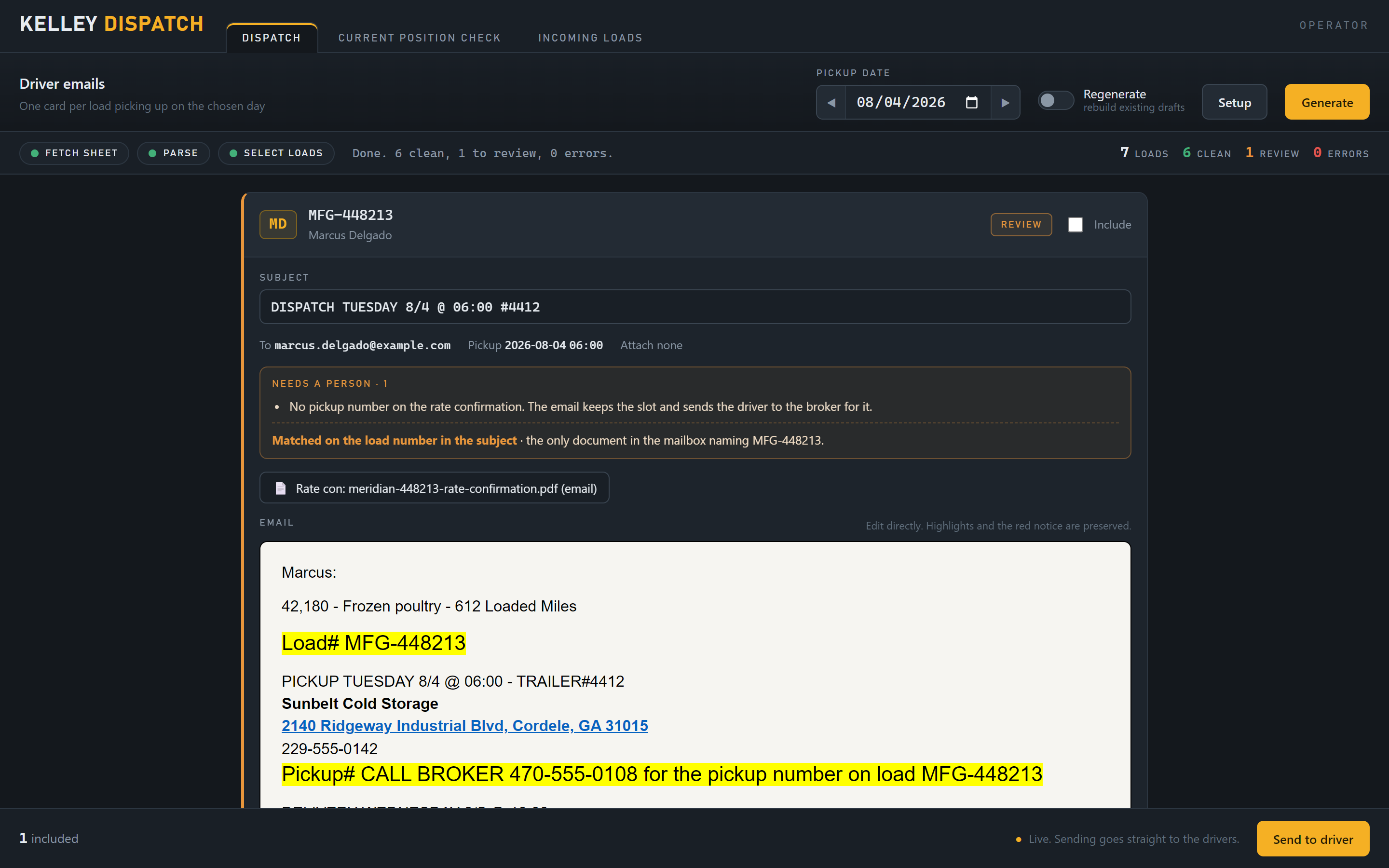
Every afternoon the office builds one email per driver for the next day's load. This tab drafts them. It reads the spreadsheet, finds each driver's next load, takes that load's documents off the Loads board, and uses Claude to read them, classify them, and extract the load details. When the board cannot answer, it falls back to the search that used to mean opening folders, across about 12,000 messages and about 123,000 files per load, without anyone watching it.
Composition follows a strict driver and office split. Drivers get addresses, dates, appointment windows, reference numbers, and equipment requirements. Rates and payment terms never leave the office, and the rate confirmation itself is never attached to a driver email. Every requirement in the email cites the document it came from, and one that cannot is flagged rather than dropped.
Every email lands as an editable review card with plain-language flags, a formatting bar, a computed loaded-miles line, and the tracking-app instruction copied word for word from the spreadsheet. Generating sweeps the mail first, so no email is composed against a stale board. A person reads it, edits it, and sends it. Sends go out through the client's own dispatch mailbox and mirror to Sent, so the audit trail stays where the office already looks for it.
Current Position Check
ONE BUTTON AT 5 AM
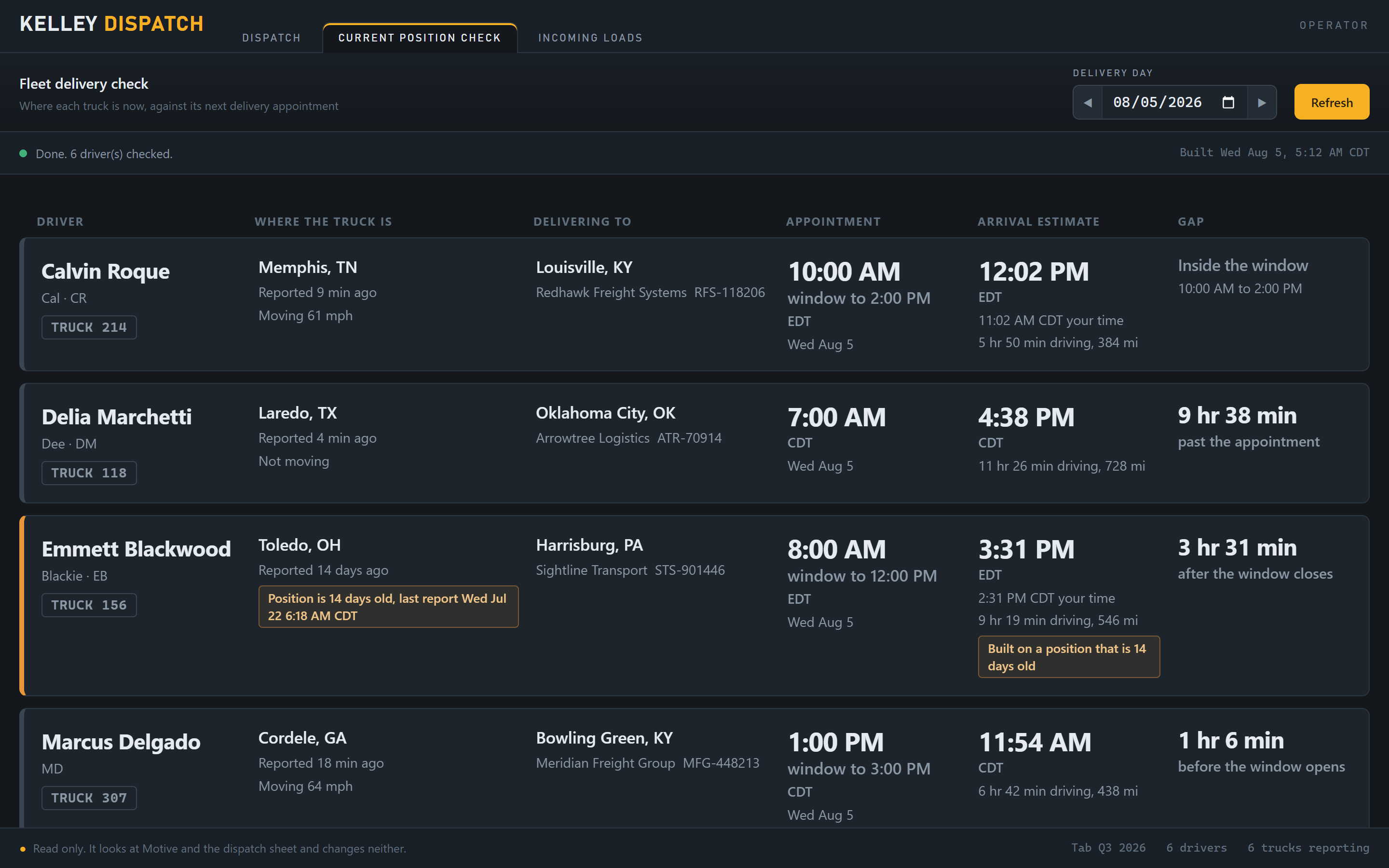
One button replaces the truck-by-truck walk through the fleet portal. A single fleet API call returns every truck. The app pairs each position with that driver's next delivery from the spreadsheet, computes drive time, and shows the appointment and the ETA side by side in the receiver's time zone with Central alongside it, so nobody does time zone math from memory at 5 AM.
A truck that stops reporting gets an amber staleness flag rather than a stale position presented as current. The check reads the pickup date as well as the delivery, so a Friday pickup with a Monday delivery stays on the board all weekend, and it treats a finished load as delivered from the truck's own position, since the fleet provider publishes no delivered signal. Both decisions print their reasoning on the row.
There is deliberately no verdict logic. The tool never declares a truck early or late. It puts the two times next to each other and the dispatcher reads them, because the dispatcher knows about the construction on the route and the receiver who takes trucks an hour before the window. This tab is read-only end to end: nothing reaches the fleet account, the spreadsheet, or the mailbox.
Mechanical
REPAIR PAPERWORK, GROUPED BY TRUCK
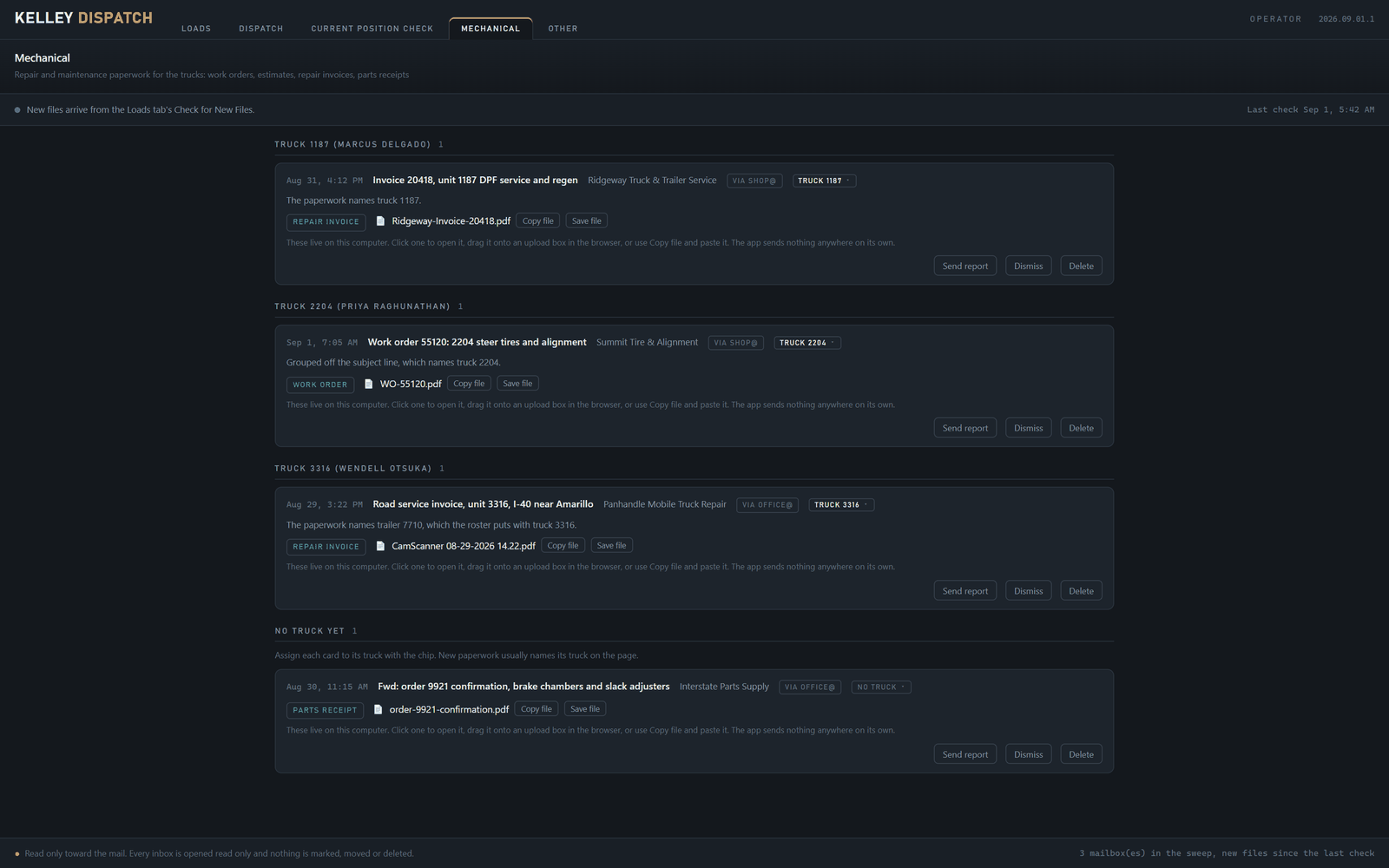
Work orders, estimates, repair invoices, and parts receipts arrive by email, and repair paperwork belongs to a truck, not a load. This tab reads the office mailboxes and lays each document out as a card, grouped into a section per truck.
The truck on each card is resolved in a fixed order: a hand assignment first, then what the pages say checked against the driver roster, then a truck number seen in the subject line or an attachment name. Anything still unresolved waits in a pile marked no truck yet, where a person assigns it with one click. A hand assignment is permanent, and no later sweep can move it.
From the card, a person can open the document, drag it onto a browser upload box, copy the file, or save it into the office filing folder. Nothing is written back to the mailbox or the drive.
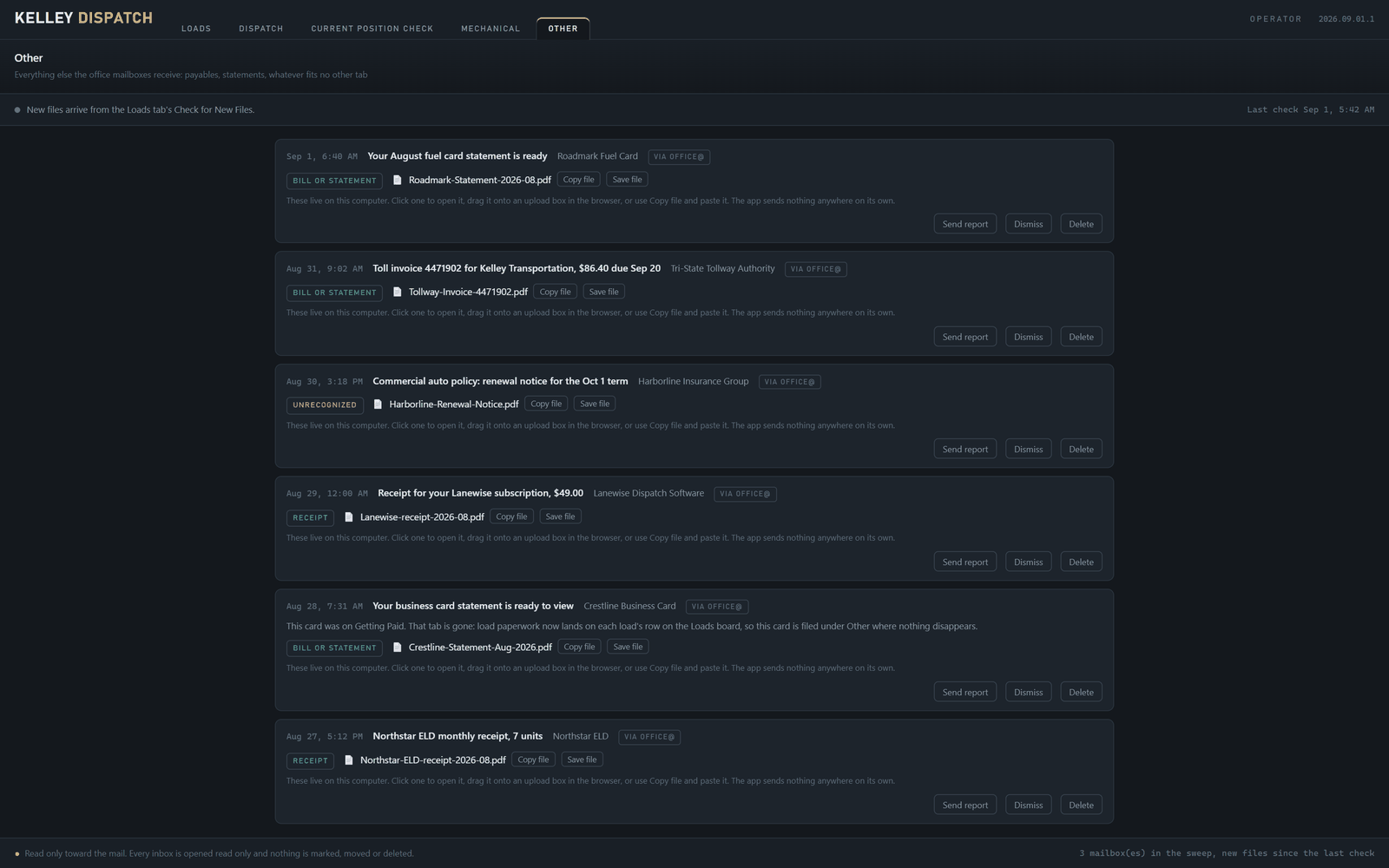
Other
THE PAYABLES, IN ONE PLACE
Everything that is not a load and not a repair: credit card statements, fuel, tolls, subscriptions. The same cards and the same mechanics as Mechanical, so the person paying the bills opens one tab instead of several mailboxes.
Each card can be opened, dragged, copied, saved, or dismissed, and deleting one takes two clicks so a slip of the hand does not lose a bill. Like Mechanical, this tab writes nothing to the client's Google systems.
WRITES ONLY ON A PRESS
Only the Loads tab writes anything back, only to the operations spreadsheet, and only when a person presses the button. Every write re-checks that the row is still the right one and refuses by name if it is not. Nothing writes on a timer, nothing writes to the shared drive, and the owner's own already-sent marker is never touched. Sheet writes went live at the end of August, and the first one was checked cell by cell.
ONE BUTTON, NO CLOCK
One Check for New Files button on the Loads tab runs every sweep for every tab. There is no timer and no sweep at startup. A sweep costs Claude calls, so it is always a person's decision, and the app can say first whether the Claude subscription has room left for it.
THEIR STACK
It runs on two of the client's own machines, through their mailbox, their drive, their fleet account, and their own Claude subscription. Nothing routes through our infrastructure, so the work does not depend on us staying in the picture. New builds arrive on startup from a restricted folder in their own drive, hash-verified, with the previous build kept as a rollback copy.
FLAGS, NOT GUESSES
Missing fields, unreadable documents, conflicting paperwork, and trucks that stop reporting all surface as flags. Nothing gets quietly filled in, and nothing gets quietly discarded. When something still looks wrong, one click on the card sends us everything the app holds about that item, so a bug report arrives with its evidence attached.
The Numbers
Build and run figures as of the latest build. The two outlined tiles are the search surface the app crosses on every load it looks up.
~2 WEEKS
Initial Build, First Three Tabs
1,704
Tests Green at the Latest Build
822
Application Checks Green
142
Documents in the First Live Run of the Rebuilt Intake
~12,000
Mailbox Messages Searched Per Load
~123,000
Drive Files Searched Per Load
7.9 SEC
Warm Re-check of the Loads Board
10,155
Sent Messages Scanned to Recognize 18 Hand-Sent Dispatch Emails
Accuracy check.
Given the same rate confirmation as a dispatch email the office had already sent by hand, the pipeline reproduced every data field, including an exact match on the subject line.
First fleet review.
The client read every row of the position check against what the office already knew that morning. Every row matched.
First live write.
The first row the app wrote to the real operations workbook was written by hand from the app, watched, and verified cell by cell against the paperwork.
The client's own estimate
Within the first two weeks the client put the time saved at first an hour a day, then three to four hours a day, and said the build was already saving 80 percent of the work. Those are the client's estimates rather than measurements we took. What we can say is that the app is in daily use by the owner and the operations manager on their own machines.
What Comes Next
The build is complete and in daily use. The owner and the operations manager each run the app on their own machine, and every sweep, draft, and write starts with one of them pressing a button.
Hardening continues as daily runs surface edge cases. Reports arrive through the button on the card with the app's own record of the item attached, and fixes ship through the updater the next time the app starts.
Real paperwork is the only test that counts.
Common Questions
FAQ
What manual work did this automation replace?
Four things. Building each driver's next-day dispatch email by hand, which took about 15 minutes per driver every day. Checking every truck's position against its delivery appointment one truck at a time at 5 AM, with time zone math done in someone's head. Noticing new load paperwork as it arrived by email and drive, then retyping it onto the operations spreadsheet. And sorting repair and payables paperwork by truck out of the office mailboxes.
Does the app write to the client's spreadsheet or shared drive?
The Loads tab writes to the operations spreadsheet, three ways, and only when a person presses the button: setting a load's stage, saving edited cells, or adding a row for a load the sheet does not yet carry. Before every write it re-reads the row and confirms the load number still matches, and it refuses by name when it cannot place a row safely. Nothing runs on a timer, nothing is written to the shared drive, and the owner's own already-sent marker column is never touched. The other four tabs write nothing to the client's Google systems.
What happens when paperwork is missing or wrong?
It gets flagged, never guessed at and never silently dropped. Dispatch emails arrive as editable review cards carrying plain-language flags, so a person reads, edits, and sends. A document the Loads tab cannot place is kept and flagged for a human to look at. A truck that stops reporting its position gets an amber staleness flag on the fleet check.
What does the system run on?
The client's own machines, the client's own accounts. Their dispatch mailbox, their shared drive, their fleet provider account, and their own Claude subscription. Nothing routes through our infrastructure, and sends go out through their mailbox and mirror to Sent so the audit trail stays where the office already looks.
How long did the build take?
The first three tabs took about 2 weeks, from access handover to running on the client's own machine. The full five-tab app took about five more weeks of build-out after that, and hardening continues as daily runs surface edge cases.
Do you build this for other fleets and businesses?
Yes. The pattern applies anywhere a person reads documents and retypes what they say into another system. We scope the work against the paperwork you actually receive, build on your machine and your accounts, and keep a person in the approval seat. Get in touch and we will look at your workflow.
Someone in Your Office Is Retyping This Already
This kind of work falls under our automation service. We build document processing that runs on your machine and your accounts, reads the paperwork you already receive, and stops at a review screen so a person still approves the work.